Create Stunning Neon Glitter Effects with Procreate Brushes
There's a certain magic that happens when you combine the glow of neon with the sparkle of glitter. It's a visual language that speaks of celebration, nightlife, and bold, unapologetic fun. For digital artists and designers working in Procreate, capturing that specific energy has often required layering multiple effects or using complex blending modes. The Procreate Brush Glow Neon Glitter Light set changes that, offering a dedicated toolkit designed to bring that electrifying shimmer directly to your canvas with a single stroke. This isn't just another collection of brushes; it's a specialized instrument for adding a layer of festive, eye-catching brilliance to your work.
A Toolkit for Festive and Bold Creations
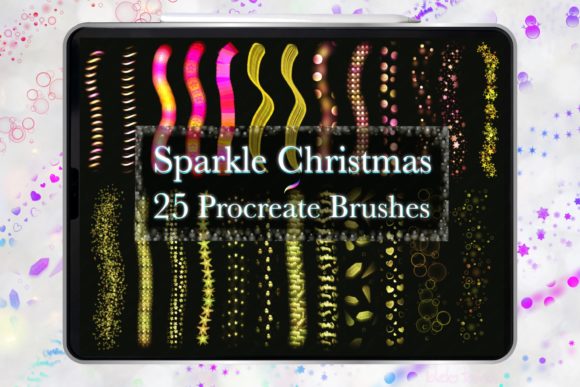
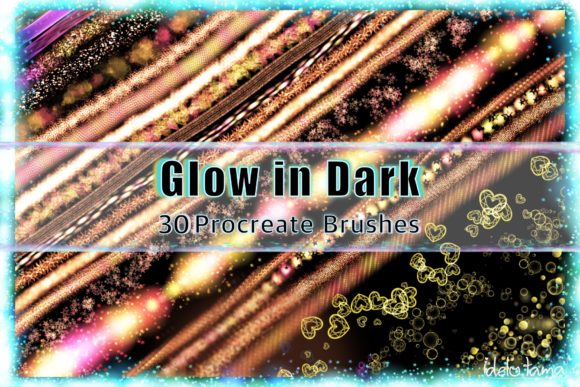
At its core, this kit contains 30 meticulously crafted stamp and stroke brushes, each engineered to produce a distinct neon glitter effect. The personality of these brushes is vibrant, playful, and inherently decorative. They are built to create elements that stand out, making them perfect for projects where the goal is to grab attention and convey a sense of occasion. The visual style leans heavily into modern celebration aesthetics—think the bright lights of a city at night, the sparkle of a disco ball, or the joyful glow of holiday ornaments.
The real-world applications for such a tool are surprisingly broad. As a designer, I immediately see their value in packaging design for limited-edition products or holiday releases. Imagine a cosmetic box or a premium beverage label where the brand name is rendered in a glowing, glittery stroke. It instantly communicates luxury and festivity. For social media graphics, these brushes are a game-changer. They can be used to create standout Instagram story backgrounds, highlight reel covers, or animated post elements that catch the eye while scrolling. The brand identity for a nightclub, a music festival, or a trendy boutique could incorporate these effects into logos, signage, and merchandise for a cohesive, high-energy look.
From Digital Canvas to Physical Product
One of the most compelling aspects of the Procreate Brush Glow Neon Glitter Light set is its seamless transition from digital design to physical products. The brushes are pressure-sensitive when used with an Apple Pencil, allowing for dynamic line variation that mimics the natural flow of a real brush or marker. This sensitivity is crucial for creating professional-looking illustrations and lettering. Applying more pressure results in thicker, more saturated strokes, while a lighter touch yields delicate, sparkling lines.
This capability is essential for entrepreneurs and small business owners looking to create their own merchandise. Designing a t-shirt graphic, a mug illustration, or wall art becomes an intuitive process. You can sketch out your concept, apply the neon glitter effect with precision, and export a high-resolution file ready for print-on-demand services. The kit is specifically noted for its effectiveness on darker backgrounds, where the glow and color effects truly pop. This makes it ideal for creating greeting cards, invitations for evening events, or scrapbook layouts with a night-sky theme. The brushes allow you to build complex ornamental borders, frame key text, or add standalone decorative elements that elevate the entire composition.
Practical Guidance for Seamless Integration
Integrating a new design asset into your workflow should be straightforward, and this kit is designed for ease of use. The process is as simple as downloading the .brushset file and opening it in Procreate, where it will automatically populate your brush library. However, to get the most out of it, a bit of strategic thinking is helpful.
When choosing a project for these brushes, consider the overall mood. They are inherently festive and bold, so they pair exceptionally well with clean, simple sans serif fonts for body text, allowing the glittery headlines or elements to shine without visual competition. For a more playful or retro vibe, pairing them with a rounded or script font can be effective, but be mindful of readability. Always test your color palette. The brushes are optimized for darker canvases, but experimenting with mid-tones or even lighter colors can yield interesting, albeit more subtle, effects. The included color palette is a starting point; don't hesitate to sample colors from your existing project to maintain brand consistency.
Remember, these are design assets meant to enhance your creative vision, not dictate it. Use them to add accent strokes to a logo concept, create a full-page background for a digital scrapbook, or design a single, stunning gift tag. The 30 variations provide enough range to avoid repetition across a series of social posts or a multi-page invitation suite. By viewing this brush set as a specialized tool in your creative font and illustration toolkit, you can unlock new possibilities for adding professional, eye-catching sparkle to a wide array of personal and commercial projects.