Master Modern Calligraphy: iPad Lettering in Procreate
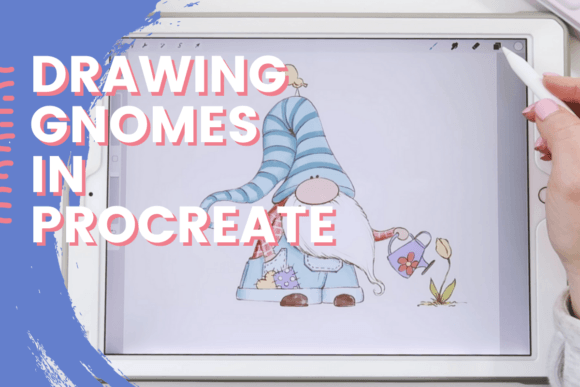
Modern calligraphy is having a major moment. You see its playful, expressive loops on wedding invitations, cafe menus, product packaging, and social media posts. It’s a style that feels personal, warm, and incredibly versatile. But picking up a brush pen and ink can be messy and intimidating. That’s where the magic of the iPad comes in. Learning iPad Lettering for Beginners in Procreate is your direct path to creating beautiful, flowing script without the cleanup or the cost of endless paper.
What is iPad Lettering in Procreate?
At its core, this is digital handwriting designed to mimic the fluid, pressure-sensitive strokes of a traditional brush pen. The visual style is unmistakable: thick and thin strokes created by varying pressure, flowing connections between letters, and an overall handmade, organic feel. It’s not a rigid, uniform script font; it’s a living, breathing handwritten font style you create yourself, stroke by stroke. The personality is playful, approachable, and modern. It avoids the stuffiness of formal cursive, leaning into a more relaxed, contemporary vibe that connects instantly with audiences.
Where This Digital Calligraphy Truly Shines
The applications for this skill are vast, bridging personal projects and professional brand identity work. It’s a creative font style that adds a human touch where it’s needed most.
- Branding & Logo Design: A custom lettering piece can become the heart of a logo for a boutique, bakery, or creative studio. It offers uniqueness that a standard display font cannot match.
- Packaging & Product Design: Imagine hand-lettered labels on artisanal goods, cosmetics, or coffee bags. It communicates care, quality, and small-batch authenticity.
- Editorial & Publishing: Use it for magazine headlines, chapter titles in books, or pull quotes in blog posts. Paired with a clean sans serif font, it creates stunning visual hierarchy.
- Digital & Social Media: This is where it thrives. Create eye-catching Instagram graphics, YouTube thumbnails, Pinterest pins, and website hero images. Its personality boosts audience engagement.
- Marketing & Advertising: From sale announcements to email headers, digital calligraphy cuts through the noise of generic corporate type. It feels like a note from a friend.
- Personal & Craft Projects: Design your own wedding vows, create personalized quotes for wall art, or craft unique greeting cards. The design assets you create are entirely yours.
The Strategic Impact on Your Projects
Choosing to incorporate iPad lettering isn’t just an aesthetic decision; it’s a strategic one that influences how your message is received.
Readability & Visual Hierarchy: Used thoughtfully, it commands attention. A lettered headline draws the eye first, establishing a clear entry point. However, it’s crucial to avoid setting long paragraphs in this style. Its charm is for display, not body text. Pair it with a highly readable serif font or sans serif font for captions and descriptions.
Brand Perception & Recognition: Consistent use of a particular lettering style becomes a signature. It can make a brand feel approachable, artisanal, and authentic. This builds recognition and fosters an emotional connection that sterile, off-the-shelf fonts often lack.
Professionalism & Consistency: The key is control. Learning the fundamentals in Procreate means you can create consistent design assets across all platforms. You’re not just picking a premium font; you’re developing a skill that allows you to produce commercial font-quality lettering tailored exactly to a project’s needs.
Practical Guidance for Getting Started
Ready to dive in? Here’s how to approach this new skill with a designer’s mindset.
- Start with the Tools: You need an iPad, an Apple Pencil, and the Procreate app. The pressure sensitivity of the Pencil is non-negotiable for achieving those beautiful thick and thin transitions.
- Use a Guided Practice Sheet: A structured approach is vital. A good practice sheet will guide you through basic strokes, loops, and letterforms. This builds the muscle memory needed for consistency. Look for a resource that provides this sheet in the second session or module.
- Evaluate Your Project Fit: Ask yourself: What is the tone of this project? Does it call for warmth and personality? If it’s a serious legal document or a data-heavy report, a sans serif font is likely better. If it’s a lifestyle brand, a wedding, or a creative portfolio, lettering is a powerful choice.
- Test Font Pairings: Your lettering is the star, but it needs supporting actors. Test it with various font pairings. A bold, modern sans serif can provide a clean, contemporary contrast. A classic serif font can add a touch of elegance. The goal is harmony, not competition.
- Understand Licensing (If Applicable): If you create lettering and plan to sell it as a font file to others, you must understand commercial font licensing. However, if you’re creating lettering for your own client projects or products, the artwork you produce in Procreate is your original asset.
Making It Your Own
The true power of learning iPad Lettering for Beginners in Procreate lies in the shift from consumer to creator. You’re no longer limited to the typeface libraries you own. You gain the ability to generate unique modern typography on demand, perfectly suited to any brief. It’s a practical, valuable skill that enhances your creative toolkit, whether you’re a marketer crafting social campaigns, an entrepreneur building a brand, or a crafter personalizing gifts. Start with the fundamentals, practice the strokes, and soon you’ll be adding your own signature style to the world.