Mastering Design Iterations in Studio
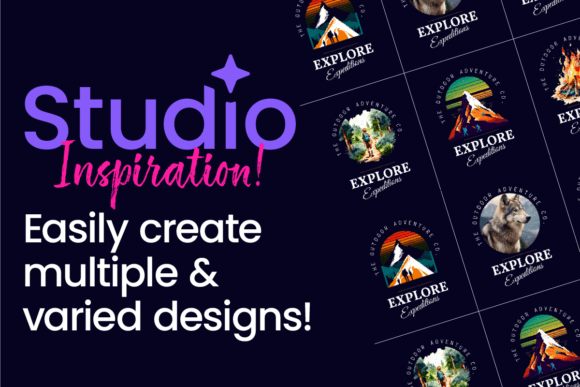
Every designer knows the pressure of that first blank canvas. You have a concept in mind, a vague idea of the brand identity you want to build, but translating that into a single, perfect design is often paralyzing. The reality of modern design work—whether for a startup, a blog, or a marketing agency—is that the first idea is rarely the best one. This is where the concept of variation becomes your most powerful tool. Instead of searching for one "perfect" layout immediately, the goal is to generate a spectrum of possibilities. By embracing the creation of multiple design variations, you move from guessing to curating, allowing you to find the perfect visual language through exploration rather than rigid planning.
The Art of Iteration in Modern Typography
When we talk about generating variations in a tool like Studio, we aren't just talking about changing colors. We are talking about the fundamental architecture of the design. A premium font is not merely a set of characters; it is a system of weights, styles, and ligatures that can completely alter the personality of a project. Learning how to create multiple design variations in Studio involves understanding how a single typeface can shift from a bold display font for a headline to a refined serif font for body copy, all while maintaining a cohesive brand identity.
Consider the nuance of modern typography. A variation isn't just about size; it's about texture and tone. You might start with a clean sans serif font for a tech startup, but by generating a variation that incorporates a subtle script font or a handwritten font for accent text, you instantly change the audience's perception from "corporate" to "approachable." In Studio, the ability to toggle these elements quickly allows you to present clients—or yourself—with a mood board of potential realities.
Visual Characteristics and Personality
The visual output of a robust design variation process is defined by balance. When you generate three or four distinct looks for a single project, you are testing the boundaries of the creative font you have chosen. Does the typeface hold up when used as a massive hero image on a website? Does it remain legible when shrunk down for legal disclaimers on packaging design?
A successful variation set usually explores contrast. For instance, one variation might rely on high-contrast pairings—mixing a heavy, blocky sans serif with a delicate, thin serif—to create drama and hierarchy. Another variation might play with monotony, using a singular font family across all elements to create a sense of calm and stability. The personality of the design changes drastically based on these choices. A playful, rounded font suggests creativity and fun, making it ideal for children’s products or lifestyle blogs, whereas a sharp, geometric typeface suggests efficiency and logic, perfect for financial services or tech firms.
Practical Applications Across Industries
The need for multiple variations spans every sector of the market. For the entrepreneur or small business owner, this process is vital for logo design. Your logo needs to live on a billboard, a business card, and a favicon. By creating variations in Studio, you ensure your brand identity is flexible enough to survive any medium.
- Editorial and Publishing: In editorial design, hierarchy is king. You need to establish a clear flow from the headline to the sub-header and the body text. Variations allow you to test different font pairing strategies to see which combination best guides the reader's eye without causing fatigue.
- Digital and Web: For web design and social media graphics, speed and readability are paramount. A variation that looks great on a desktop monitor might be illegible on a mobile screen. Testing different weights and line heights ensures your content is accessible to everyone.
- Product and Packaging: On a shelf, you have three seconds to grab attention. Packaging design relies heavily on the "voice" of the font. Is it shouting for attention with bold block letters, or whispering luxury with elegant italics?
Even for hobbyists and crafters, the ability to generate variations is a game-changer. If you are designing invitations or digital prints, you want to see how a commercial font interacts with your background textures and illustrations. Does the script font clash with the floral elements? Does the serif font get lost in the noise? Generating variations answers these questions before you commit to the final print.
Evaluating Fit and Font Pairing
Choosing the right typeface for a project is often a mix of intuition and logic. However, once you have selected your primary design assets, the work of pairing begins. A common mistake is pairing two fonts that are too similar; this creates visual discord rather than harmony. A good rule of thumb is to pair a serif with a sans serif, or a display font with a highly legible body font.
When you create multiple design variations in Studio, you are essentially stress-testing these relationships. You might try a variation where the headline is a handwritten font and the body is a standard sans serif. In the next variation, you swap the handwritten font for a bold slab serif. This process helps you understand the "vibe" of the project. It moves the conversation away from "I like this" to "This specific combination communicates trust and authority."
Ensuring Professionalism and Readability
While aesthetics are important, the ultimate goal of any design is communication. If your audience cannot read the message, the design has failed. This is where the technical aspects of your chosen premium font come into play.
When reviewing your variations, pay close attention to x-height (the height of lowercase letters) and letter-spacing. A font with a low x-height might look elegant in a headline but become a nightmare to read in long-form text. Similarly, tight kerning (spacing between letters) can look stylish in a logo but feel claustrophobic in a paragraph.
Professionalism is often conveyed through consistency. When you present a brand guide that includes specific variations for different use cases, you signal to clients and customers that you have thought through the details. You aren't just picking a font; you are building a typographic system. This system ensures that whether the customer sees your brand on a social media ad or a formal letter, the visual voice remains consistent.
Licensing and Commercial Use
Before finalizing any design, especially for commercial projects, you must address the legalities. A commercial font license is not just a receipt; it is permission to use the intellectual property of the type designer.
When you download design assets, check the licensing terms carefully. Does the license cover web embedding? Does it cover physical merchandise? If you are creating variations for a client, ensure the license is transferable or that the client purchases their own copy. Ignoring this step can lead to legal headaches down the road. Many foundries offer different tiers of licenses, so understanding your specific use case—whether it’s for a local bakery’s menu or a global advertising campaign—is essential.
Final Thoughts on Creative Exploration
The process of generating multiple design variations is about embracing the "what if." It is about refusing to settle for the first draft. In a crowded digital landscape, the brands that stand out are those that have a clear, intentional visual identity. By utilizing tools like Studio to explore the full potential of your creative font choices, you ensure that the final product is not just beautiful, but effective, readable, and perfectly aligned with the project's goals. Dive in, experiment with bold pairings, and let the variations guide you to the perfect solution.